
Call us now :08045800460
 Send Inquiry
 Send Inquiry
Supervision Software: Pilot for Windows
Supervision Software: Pilot for Windows Specification
- Voltage
- Standard PC Power (110-240V AC)
- Measurement Range
- Network/Wired Connections: Up to 1000 m
- Accuracy
- High Precision Monitoring and Logging
- Frequency
- 50-60 Hz
- Temperature Range
- 0C to 60C
- Feature
- Real-Time Supervision, Multi-Window Display, Event Recording
- Capacity
- Supports up to 256 Cameras
- Model No
- Pilot for Windows
- Core Components
- Software Application, User License
- Power Source
- PC Operated (Electricity Dependent)
- Automation Grade
- Fully Automatic
- Equipment Materials
- Digital (Software Only)
- Type
- Supervision Software
- Usage
- Video Monitoring, Surveillance Control
- Display Type
- LCD/LED Display Compatible
- Dimension (L*W*H)
- Software (Not Physical)
- Weight
- Software Product (Not Applicable)
- User Access Levels
- Multiple User, Password Protected
- Camera Compatibility
- IP CCTV, Analog (via Encoder)
- Recording Format
- AVI, MP4
- Event Notification
- Email, Pop-up Alert, Alarm Trigger
- Storage Requirement
- Min. 500 GB HDD
- Graphical Interface
- User-friendly GUI
- Internet Connectivity
- Required for Remote Access
- RAM Requirement
- Min. 4 GB
- Maximum Simultaneous Viewers
- Up to 16 Screens
- Language Support
- Multi-Language (English, Others Optional)
- Technical Support
- Online and Telephonic Assistance
- Operating System Compatibility
- Windows 7/8/10/11
- Software License Type
- Single/Multi User
- Integration
- Compatible with Third-Party Devices
- Network Protocol Support
- TCP/IP, UDP
- CPU Requirement
- Intel Core i3 or Higher
About Supervision Software: Pilot for Windows
Introduction
Each supervision software concerning univocally a specific plant operates in Windows and enables:
To control ON-OFF signals, that is controlling pumps, compressors, resistors etc. from a PC
To communicate with the microprocessor PID controller installed on the plant, that is gathering all data coming from the controller and carrying out all the operations being available on instrument display, from a PC
To display the trend of process parameters in real time
to display the historical trend of process variables No card will be inserted into the PC to use this software: just connect the plant with the serial port (COM1 or COM2) of the PC via the serial cable of the equipment.
Efficient Video Monitoring and Surveillance Control
Pilot for Windows streamlines security operations by allowing real-time supervision and multi-window video monitoring. Supporting up to 256 cameras and 16 simultaneous viewing screens, it is ideal for businesses, institutions, and facilities that require extensive coverage. Built-in event recording and multiple alert notifications ensure that critical moments never go unnoticed. Its easy-to-navigate graphical interface minimizes the learning curve for users of all experience levels.
Robust Compatibility and Integration
Pilot for Windows is engineered to integrate effortlessly into a diverse array of environments. Supporting IP CCTV and analog cameras (via encoders) and offering compatibility with third-party devices, it enhances existing hardware investments. The system supports TCP/IP and UDP protocols, is optimized for standard PCs, and requires only an internet connection for remote access, ensuring flexible deployment.
User Access, Security, and Support
With multiple user levels and password protection, Pilot keeps your surveillance data secure. Licenses are available in single or multi-user formats to fit different organizational structures. The software supports English and other optional languages, and provides end-users with comprehensive online and telephonic technical support, ensuring minimal downtime and prompt assistance.
FAQ's of Supervision Software: Pilot for Windows:
Q: How does the Pilot for Windows supervision software support multiple camera types?
A: Pilot for Windows is compatible with both IP CCTV cameras and analog cameras (via encoder), allowing users to integrate new and existing camera systems into one unified monitoring solution. This flexibility enables seamless upgrades and expansion, accommodating a wide range of surveillance setups.Q: What are the hardware and operating system requirements for installing Pilot for Windows?
A: To install and operate Pilot for Windows, you need a PC with Windows 7, 8, 10, or 11, an Intel Core i3 processor or higher, a minimum of 4 GB RAM, and at least 500 GB HDD storage. The software is compatible with both LCD and LED displays and requires standard PC power (110-240V AC).Q: When and where can users access the surveillance feeds remotely?
A: Remote access is available at any time from any location with internet connectivity. Users can monitor live video, review recordings, and respond to alerts from authorized devices, ensuring security even off-site.Q: What is the process for receiving event notifications through the software?
A: Pilot for Windows notifies users of critical events through multiple channels: email, pop-up alerts, and alarm triggers. Once an event is detected, such as motion or unauthorized access, the system automatically delivers notifications based on the configured preferences.Q: How does the user access and security system operate in Pilot for Windows?
A: The software offers multiple user access levels, allowing administrators to set specific permissions for each user. All access is password protected, ensuring that only authorized personnel can view or manage surveillance feeds and settings.Q: What are the main advantages of using Pilot for Windows for surveillance control?
A: Pilot for Windows delivers high accuracy monitoring, supports up to 256 cameras, and allows up to 16 screens for simultaneous viewing. Its robust event notification system, ease of integration, and user-friendly interface make it ideal for scalable surveillance operations in various industries.Q: Is technical support available and in what languages is the software offered?
A: Yes, technical support is provided both online and via telephone. The software comes with English language support, with other languages available upon request, accommodating the diverse needs of users worldwide.
Tell us about your requirement

Price:
Quantity
Select Unit
- 50
- 100
- 200
- 250
- 500
- 1000+
Additional detail
Mobile number
Email

More Products in Laboratory Scientific Equipments Category
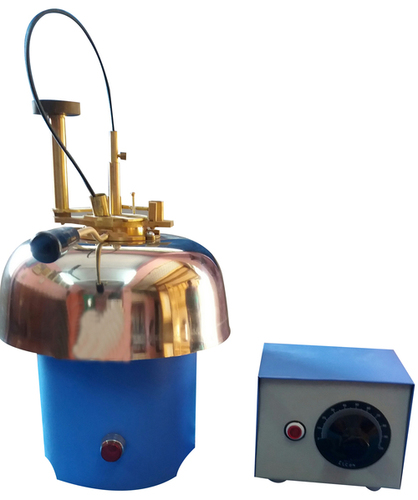
Pensky Martin Closed Cup Apparatus
Type : Closed Cup Apparatus
Display Type : Analog (Thermometer Reading)
Power Source : Electric (Mains supply)
Equipment Materials : Brass cup, gunmetal/bronze parts, steel framework
Automation Grade : Manual/Automatic
Voltage : 230 V AC
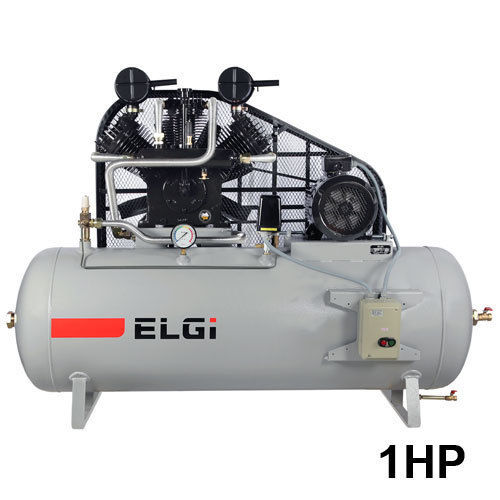
Air Compressor
Type : Reciprocating Air Compressor
Display Type : Analog
Power Source : Electric
Equipment Materials : Cast Iron Body, Steel Components
Automation Grade : SemiAutomatic
Voltage : 220240 V
Conradson Carbon Apparatus
Type : Conradson Carbon Residue Apparatus
Display Type : Analog (Manual observation)
Power Source : LPG/External Gas Burner or Electric Heater (not included)
Equipment Materials : Brass and stainless steel, with heat resistant components
Automation Grade : Manual
Voltage : 220 V (for units with optional electric heating)
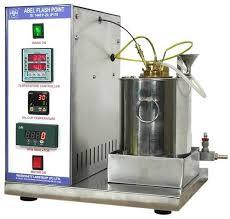
Abel Closed Cup Flash Point Tester
Type : Flash Point Tester (Abel Closed Cup Method)
Display Type : Analog
Power Source : Electric / Nonelectric (manual burner)
Equipment Materials : Brass (test cup), Cast Iron/Steel (body), Bakelite/Heatresistant plastic (handle)
Automation Grade : Manual
Voltage : 220 V

 Send Inquiry
Our Products
- Engineering Laboratory Equipments
- Heat Transfer Lab.
- Fluid Mechanics Lab.
- Fluid Machinery Lab.
- Theory Of Machines Lab.
- Refrigeration & Air-conditioning Lab.
- Laboratory Scientific Equipments
- Process Control & Instrumentation Lab.
- Chemical Reaction Engineering Lab.
- Mechanical Operation Lab.
- Mass Transfer Lab.
- Momentum Transfer Lab.
- Enviornmental & Bio-engineering Lab.
- Fluid Mechanics & Fluid Machinery
- Mechanical Engineering Lab


96, HSIDC Industrial Estate, Jagadhari Road, Ambala Cantt - 133001, Haryana, India

Mr Manoj Gupta
(Director)
Mobile :08045800460
 Send Inquiry
 Send SMS
Developed and Managed by Infocom Network Private Limited.


